

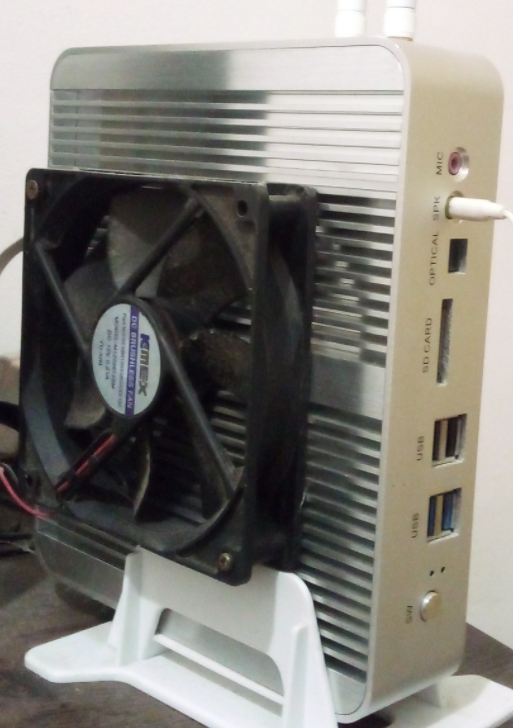
I got a pc that suffers from severe heating problems because of its poorly designed passive cooling case. I tried several strategies to put temperature under control, did a lot of tests with thermald, but ended up hacking a fan into the case. However, I still have problems with ssd temperatures.
Right now, as I write this, the nvme ssd is at 67ºC and easily goes beyond 80 or 90 during data transfers. I already lost 2 ssds before realizing this was the problem, because I was controlling just the cpu temperature.
There’s no physical way to force airflow where the ssd is, so I was wondering if there’s some way to throttle data transfer of something to prevent the ssd temperatures from reaching a threshold. All I could find was a vibecoded github repository. I don’t care if data transfer gets ridiculously slow, as long as the ssd remain safe, and I can’t consider getting any new hardware right now.
I’m currently running fedora 44 on that machine
Edit: I thought there was an easier software mitigation to that, but apparently, solutions will tend to the hardware side, so here are the hardware details:
- It’s an unbranded chinese cheap mini pc with a heat dissipation case that doesn’t dissipate well
- The ssd is mounted on the back of the motherboard. The model is a sandisk M.2 1TB 2280
Here’s a photo of the case, for the reference (don’t judge me lol):
Seconding the heat dissipator. This is the easiest option, you can usually just rip it off any electronic scrap you may have laying around or can find easily, and while it would be nice to have new thermal paste, you should be able to just salvage whatever is still stuck to it. It’ll work well enough for a while.
As an alternative, you can throttle disk read/write speeds. Just not globally, not really.
Option 1:
Cgroups. Depending on distro you either already have some cgroups set up, or you should be able to set them up; and then just set max read/write speed for each group.
After setting control groups you can wrap your command in ionice to set the command to that group.
ionice -c3 <your cp command>
Option 2:
If you only notice this during file transfers and not during normal tasks, use a compatible file transfer application that lets you limit bandwidth, for example for rsync:
rsync --bwlimit=1024 source/ destination/